What Should I Look for When Choosing a Managed IT Services Provider?
Choosing a Managed IT provider in Dallas? Learn what to look for, what red flags to avoid, and how the right MSP reduces downtime, cyber risk, and IT chaos.
Choosing a Managed IT Services provider is not just a technical decision. For a Dallas small business, it can affect uptime, cybersecurity, employee productivity, client trust, compliance readiness, insurance risk, and leadership visibility.
The right provider should not only answer tickets when something breaks. A strong Managed IT provider should help your business prevent avoidable disruptions, secure critical systems, recover from incidents, manage Microsoft 365, coordinate vendors, document the environment, and make smarter technology decisions as the company grows.
In other words, the real question is not: “Who can fix my IT problems?”
The better question is: “Who can help us reduce business risk and improve reliability while making technology easier to manage over time?”
Find out where your current IT model is helping the business, and where it may be quietly creating risk.
Quick Answer: What Should You Look for in a Managed IT Services Provider?
Look for a Managed IT provider that can prove strength in these areas:
| What to Evaluate | Why It Matters |
|---|---|
| Fast, structured support | Employees need issues resolved quickly, with clear escalation paths. |
| Team depth and local presence | The provider should have enough people, escalation experience, and local accountability to support your business when issues become complex. |
| Security-first IT management | Cybersecurity should be built into daily operations, not sold as an afterthought. |
| Proactive monitoring | The provider should detect problems before employees are forced to report them. |
| Backup and disaster recovery | Backups should be monitored, protected, and tested for real recovery. |
| Microsoft 365 and cloud governance | Email, files, identity, Teams, SharePoint, and OneDrive need active oversight. |
| Vendor accountability | Your provider should help coordinate internet, phone, copier, cloud, software, and security vendors. |
| Documentation | A mature provider should maintain inventories, diagrams, credentials, licensing, vendors, and processes. |
| Compliance awareness | The provider should understand your industry's security, privacy, insurance, and audit expectations. |
| Executive reporting | Leadership should receive visibility into risk, cost, priorities, and technology planning. |
| Strategic guidance | A strong MSP should help you plan, budget, scale, and improve. Not just close tickets. |
A good Managed IT provider should make your business feel less reactive. Fragmentation goes down, and so does exposure.
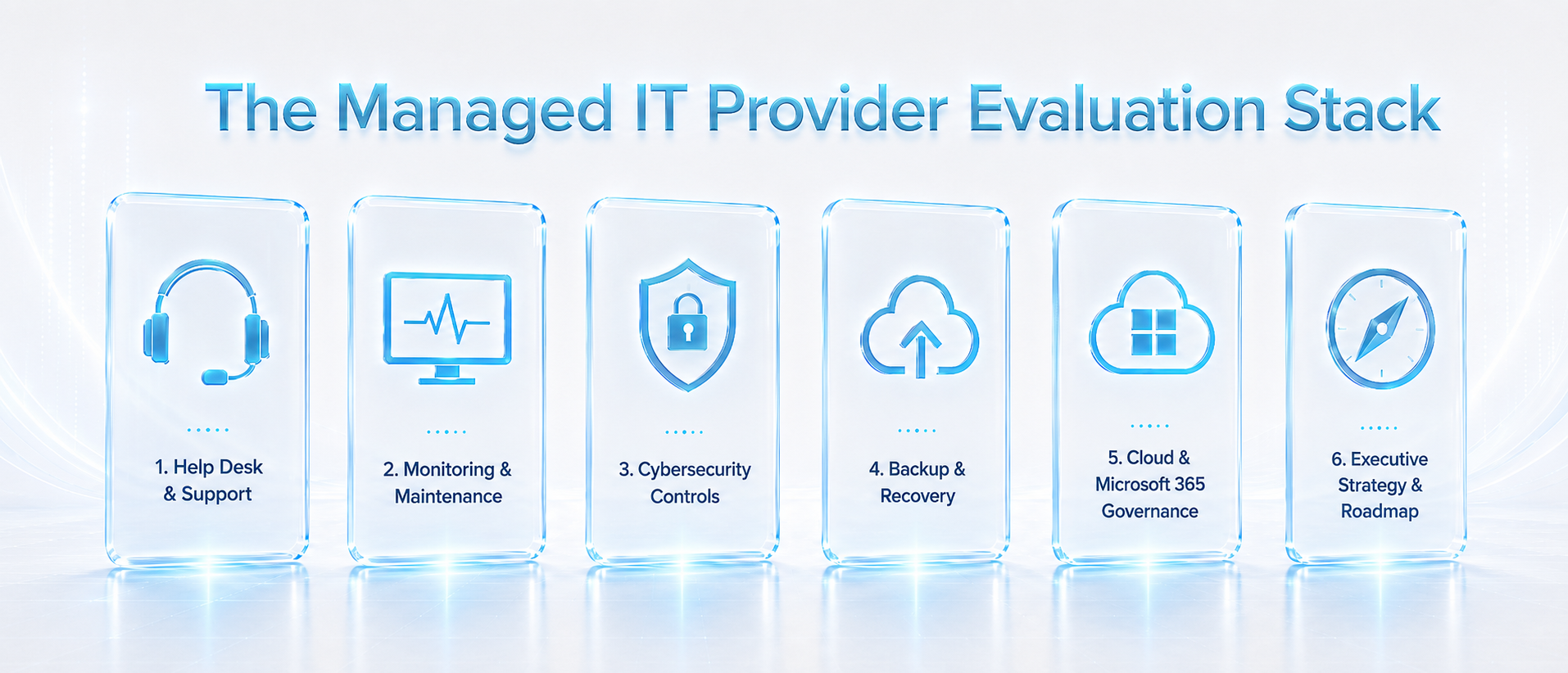
The strongest providers manage the full operating model, not just the ticket queue.
Why This Decision Matters More for Dallas Small Businesses Now
Many Dallas small businesses do not start looking for a Managed IT provider because “IT is broken.” They start looking because technology has become harder to control.
The business may have added more employees, more locations, more cloud tools, more vendors, more remote access, more customer data, more compliance pressure, or more cybersecurity exposure. But the IT structure behind the business may not have matured at the same pace.
That gap creates risk.
Common signs include:
- Employees wait too long for technical support.
- Leadership only hears about IT when something goes wrong.
- Microsoft 365 is used daily but not governed carefully.
- Former employees or vendors may still have access.
- Backups exist, but recovery has never been tested.
- Cybersecurity is limited to antivirus or basic monitoring.
- Vendors blame each other when systems fail.
- No one can clearly explain the company’s IT roadmap.
- IT spending happens during emergencies instead of through a plan.
For industries like healthcare, dental, financial services, law firms, private equity, construction, architecture, automotive, manufacturing, and distribution, the stakes are even higher. Downtime can delay revenue. Weak access controls can expose sensitive information. Poor documentation can create audit problems. Untested recovery can turn ransomware into a business emergency.
→
The Best Managed IT Providers Are Not Just Help Desks
A help desk is important. Employees need fast, practical support when passwords fail, devices break, Microsoft 365 has issues, printers stop working, applications crash, or access requests slow down the day.
But help desk support is only one part of Managed IT.
A strong Managed IT provider should also help manage:
- Devices and users
- Servers and networks
- Microsoft 365 and cloud platforms
- Email security and identity access
- Endpoint protection and patching
- Backup and disaster recovery
- Vendor coordination
- Documentation
- Cybersecurity monitoring
- Compliance support
- Executive-level planning
- Long-term technology improvements
This is where many businesses make the wrong comparison. They compare providers based on monthly price or ticket response, but they do not compare the deeper operating model.
A provider may say “we offer 24/7 support,” but that does not automatically mean they can help prevent ransomware, validate backups, govern Microsoft 365, support compliance, document the environment, or guide leadership through growth.
The stronger question is: Can this provider help us operate more securely, recover faster, support employees better, and make smarter technology decisions over time?
→
What Should Be Included in Managed IT Services?
Every provider packages services differently, but a mature Managed IT model should cover more than basic troubleshooting.
Responsive Help Desk and User Support
Employees should know how to get help, what to expect, and how issues are prioritized.
Look for:
- 24/7 or clearly defined support availability
- Remote support
- Onsite support when needed
- Clear priority levels
- Escalation from L1 to L2 and L3 support
- Ticket tracking
- Communication expectations
- Support for Microsoft 365, devices, access, software, and common user issues
Ask the provider:
"How do you define response time, resolution time, priority levels, and escalation?"
A provider saying “fast support” is not enough. You need to know what happens when a system is down, a user is locked out, or a business-critical application stops working.
Team Depth, Local Presence, and Escalation Experience
Fast support matters, but the people behind the support matter just as much.
Before choosing a Managed IT provider, ask who will actually support your users, who handles escalations, and whether the provider has enough team depth to respond when issues become complex. A small provider may be capable, but Dallas businesses should still evaluate whether the team can support after-hours needs, cybersecurity incidents, onsite issues, documentation, vendor coordination, and strategic guidance as the business grows.
You should also verify whether the provider has a real local presence. If local accountability matters to your business, ask to visit the office or meet the people who will be supporting your environment. If you are not comfortable with the team before signing, the relationship will not feel better during an outage, escalation, or security incident.
Infonaligy brings 23 years of operating experience, a Dallas-area presence, a larger team model, and Tier 2 escalation support backed by Fortune 50 corporate experience. That gives growing businesses access to more advanced technical judgment without having to build an enterprise IT department internally.
Look for:
- A real office or local presence you can verify
- A support team you can meet or speak with before signing
- Clear escalation from basic support to advanced technical resources
- Enough staff depth to support users, systems, security, vendors, and projects
- Experienced Tier 2 or senior technical support for complex issues
- A provider that can support the business as it grows, not just when tickets are simple
Ask the provider:
"Can we meet the people who will support our users, handle escalations, and advise leadership?"
→
Proactive Monitoring and Maintenance
A reactive provider waits until users complain. A stronger provider monitors systems, devices, networks, backups, and security signals so problems can be detected earlier.
Look for monitoring across:
- Workstations
- Servers
- Network devices
- Firewalls
- Cloud systems
- Microsoft 365
- Backup jobs
- Endpoint security alerts
- Patch status
- Uptime and performance
Ask the provider:
"What exactly do you monitor, who reviews the alerts, and what happens after an alert is triggered?"
→
Cybersecurity Built Into Daily IT Operations
Cybersecurity should not be treated as a separate add-on that only appears after a breach, audit, or insurance questionnaire.
Modern cybersecurity requires governance, asset awareness, protection, detection, response, and recovery. NIST’s Cybersecurity Framework 2.0 organizes cybersecurity outcomes around Govern, Identify, Protect, Detect, Respond, and Recover, which is a broader model than simply installing antivirus.
A strong Managed IT provider should help with:
- Multi-factor authentication
- Endpoint detection and response
- Email security
- Patch management
- Access controls
- Vulnerability management
- Security awareness training
- Threat monitoring
- Incident escalation
- Backup readiness
- Policy and procedure development
Ask the provider:
"Which cybersecurity controls are included in Managed IT, and which ones cost extra?"
This matters because many small businesses believe they have cybersecurity covered when they only have a few disconnected tools.
→
Backup and Disaster Recovery That Is Actually Tested
A backup is only useful if it can be restored when the business needs it.
Many companies believe they are protected because “we have backups.” The real question is whether the business can recover from ransomware, accidental deletion, hardware failure, cloud compromise, or a major outage.
Look for:
- Backup monitoring
- Recovery testing
- Recovery time objectives
- Recovery point objectives
- Immutable backup options
- Offsite or cloud replication
- Microsoft 365 backup strategy
- Disaster recovery documentation
- Business continuity planning
Ask the provider:
"When was the last time you tested a restore, and what would our recovery process look like?"
Infonaligy has published ransomware recovery scenarios where backup architecture, immutability, offsite copies, and recovery planning became the difference between prolonged downtime and a more resilient operating model. These examples reinforce a simple point: backup should not be treated as a checkbox. It should be part of business survival planning.
→
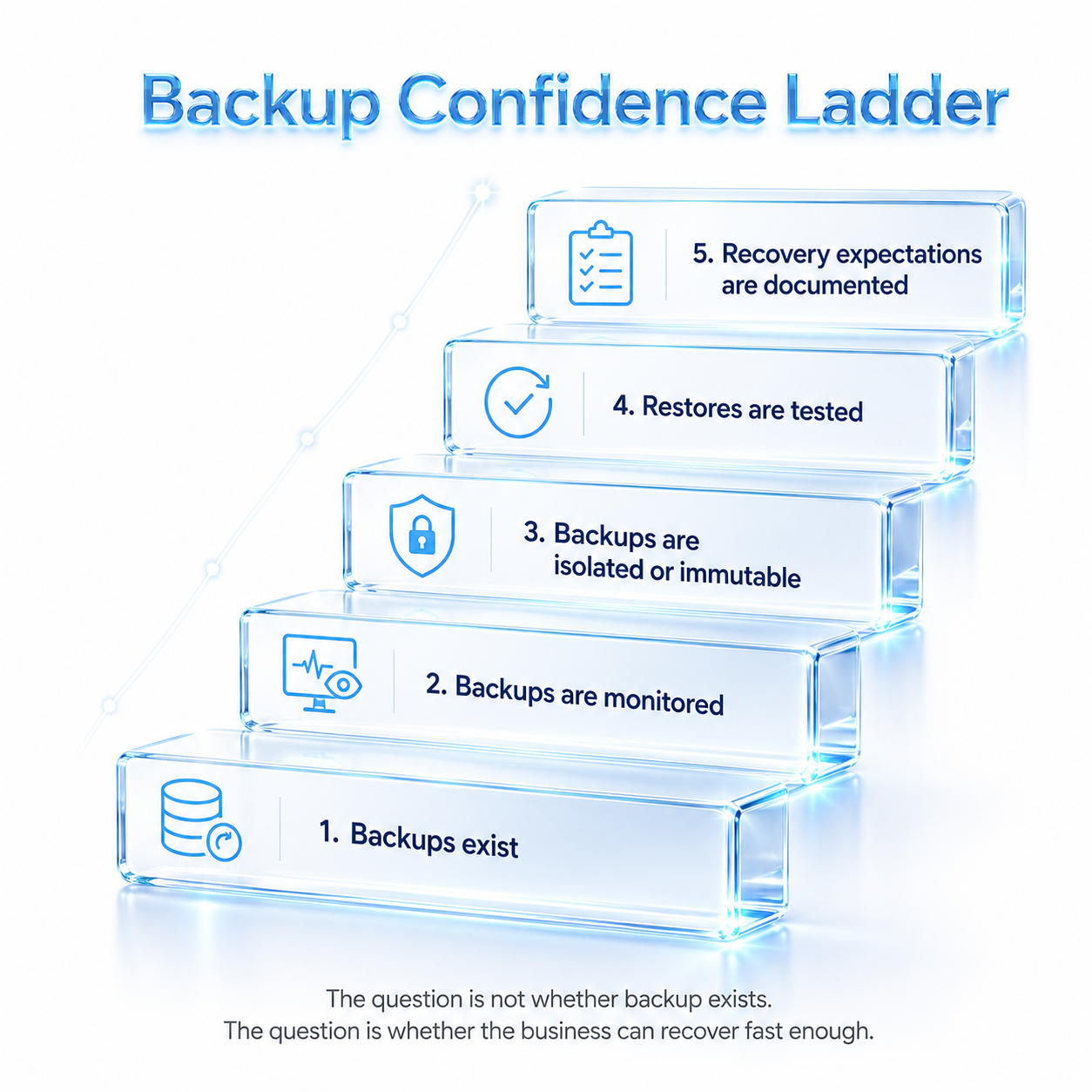
Backup confidence is built through testing, monitoring, and documented recovery processes.
Microsoft 365 and Cloud Governance
For many small businesses, Microsoft 365 is not just email. It is identity, communication, file storage, collaboration, security, and access control.
A Managed IT provider should understand how to govern Microsoft 365, Teams, SharePoint, OneDrive, Exchange, Entra ID, licenses, permissions, admin roles, and external sharing.
Look for support with:
- MFA enforcement
- Conditional access policies
- Former employee access review
- Admin role review
- SharePoint and OneDrive permissions
- External file sharing controls
- Email security configuration
- License optimization
- Cloud backup
- Migration and configuration support
Ask the provider:
"How do you manage Microsoft 365 security, identity, licensing, access, external sharing, and backup?"
This is especially important for law firms, financial services, dental practices, healthcare organizations, construction companies, architecture firms, and professional services firms that rely on secure collaboration.
→
Vendor Coordination and Accountability
Small businesses often have too many disconnected vendors: internet provider, phone provider, copier vendor, software vendor, cloud provider, cybersecurity vendor, internal staff, and outside contractors.
When something fails, vendors can blame each other. Leadership gets pulled into technical coordination. Employees wait. The business loses time.
A strong Managed IT provider should help centralize ownership.
Look for:
- Vendor inventory
- Escalation management
- Internet and phone vendor coordination
- Software vendor support
- Hardware lifecycle planning
- License management
- Documentation of vendor responsibilities
- A clear point of accountability
Ask the provider:
"When multiple vendors are involved, who owns coordination until the problem is resolved?"
→
Documentation and Onboarding Discipline
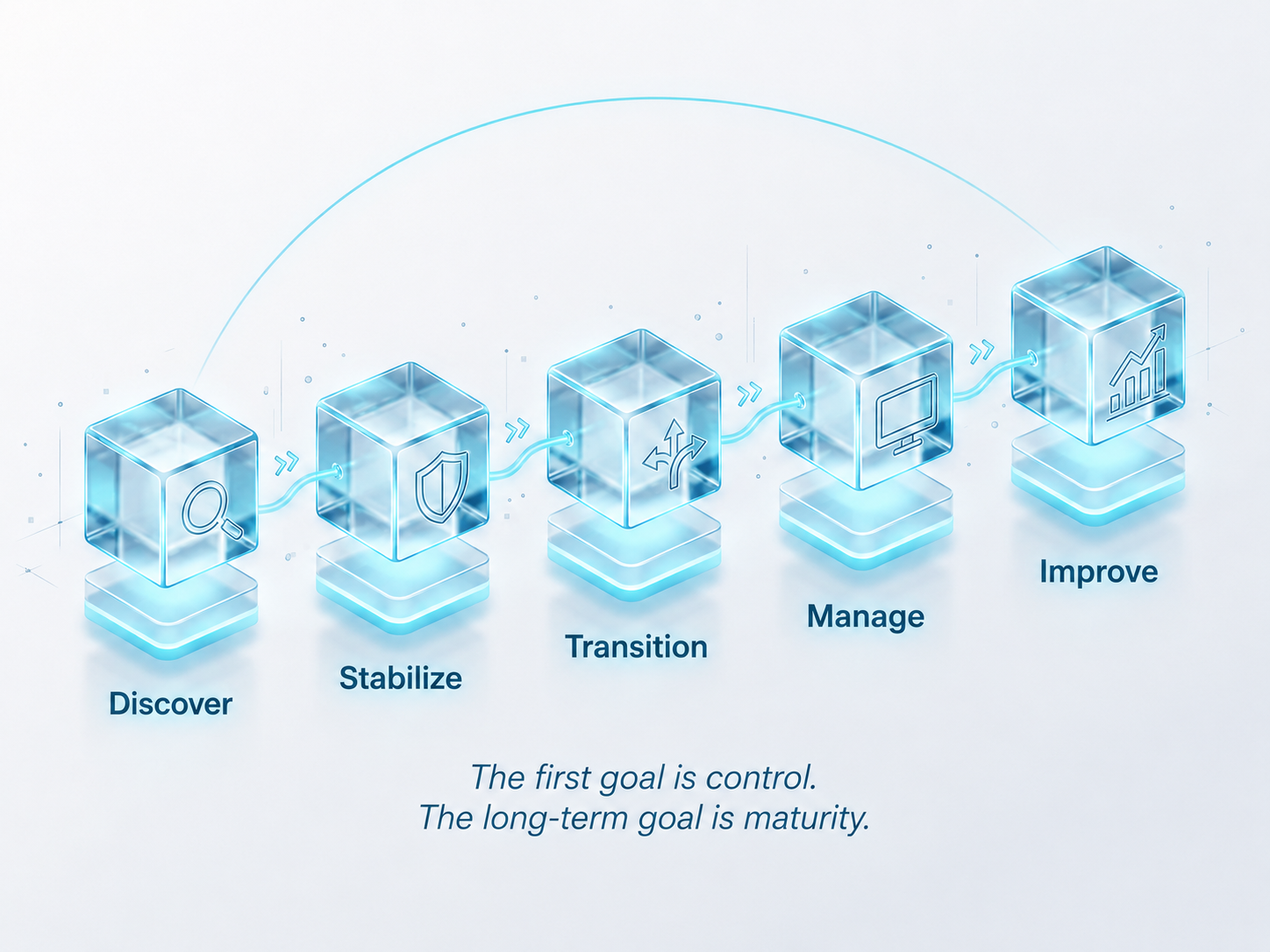
The first 30 to 90 days of a Managed IT relationship are critical. A weak provider jumps into tickets without truly understanding the environment. A stronger provider performs discovery, documents the current state, identifies urgent gaps, and creates a transition plan.
Look for onboarding that includes:
- User inventory
- Device inventory
- Server and network review
- Vendor list
- Microsoft 365 review
- Backup review
- Security baseline
- Admin access review
- Documentation
- Support transition plan
- Priority roadmap
Ask the provider:
"What exactly happens during onboarding, and what should we expect in the first 30, 60, and 90 days?"
Infonaligy’s Managed IT process is structured around discovering the environment, stabilizing urgent gaps, transitioning support into a managed model, managing the environment, and improving over time.
→
Compliance, Cyber Insurance, and Incident Readiness
Compliance is not only for large enterprises. Many Dallas small businesses handle regulated, sensitive, financial, healthcare, legal, employee, or client data.
Depending on the industry, businesses may face expectations related to HIPAA, FTC Safeguards, PCI DSS, NIST, CMMC, FINRA, SEC, SOX, cyber insurance, client security reviews, or contractual security obligations.
The FTC Safeguards Rule, for example, requires covered financial institutions to develop, implement, and maintain an information security program with administrative, technical, and physical safeguards designed to protect customer information.
Texas businesses also need to understand breach response obligations. The Texas Attorney General states that businesses and organizations experiencing a data breach affecting 250 or more Texans must report it to the Attorney General as soon as practicable and no later than 30 days after discovery, and must also notify affected consumers.
Look for a provider that can support:
- Security policies
- Access control documentation
- Incident response planning
- Security awareness training
- Vulnerability management
- Backup validation
- Cyber insurance questionnaires
- Evidence collection
- Audit support
- Executive reporting
Ask the provider:
"How do you support incident response, documentation, insurance, legal coordination, and compliance readiness?"
→
Executive-Level Strategy and Roadmap Guidance
A good Managed IT provider supports users. A stronger Managed IT provider also supports leadership.
Owners, CEOs, CFOs, COOs, presidents, operations leaders, and office managers need visibility into risk, cost, priorities, vendors, infrastructure, cloud tools, security gaps, and future investments.
Look for:
- Quarterly business reviews
- IT roadmap planning
- Budget forecasting
- Hardware lifecycle planning
- Cybersecurity maturity planning
- Vendor evaluation
- Risk reporting
- Project prioritization
- Virtual CIO guidance
Ask the provider:
"How will you help leadership understand IT risk, budget, priorities, and long-term technology planning?"
This is one of the clearest differences between a basic support vendor and a strategic Managed IT partner.
→
Red Flags to Watch for When Choosing a Managed IT Provider
Many providers use similar language: 24/7 help desk, cybersecurity, cloud support, monitoring, predictable pricing, and vCIO services. The problem is not whether those words appear on a website. The problem is whether the provider can prove what they mean.
Watch for these red flags:
| Red Flag | Why It Matters |
|---|---|
| "Fast support" with no written SLA | You need defined response, resolution, priority, and escalation expectations. |
| Cybersecurity sold only as an add-on | Security should be embedded into daily IT operations. |
| No explanation of how they secure their own access | MSPs often hold privileged access to client systems. CISA has issued guidance for MSPs and customers to reduce intrusion risk. |
| Monitoring without detail | You need to know what is monitored, who reviews alerts, and what happens next. |
| Backup without restore testing | Backups that are never tested may fail when the business needs them. |
| No Microsoft 365 governance depth | Microsoft 365 is often the backbone of identity, email, files, and collaboration. |
| No executive reporting | Leadership needs risk, budget, and roadmap visibility. |
| No documentation process | Undocumented environments create operational fragility. |
| No verified team depth or local presence | If you cannot meet the team, verify the office, or understand who handles escalations, support may become unreliable when issues become complex. |
| Generic industry language | A provider should understand your workflows, software, compliance, and downtime risks. |
| Competing mainly on low price | Low cost can mean important services are excluded or treated as extra projects. |
| Overselling AI without governance | AI adoption should include data privacy, security, vendor review, and acceptable-use guidance. |
The biggest red flag is simple: A provider that sells fast ticket response but cannot prove security maturity, backup recoverability, documentation, cloud governance, compliance awareness, and executive accountability.
→
What Should Happen in the First 30–90 Days?
A strong Managed IT provider should create early clarity and stabilization.
In the first phase, your business should expect:
Immediate Visibility
You should gain a clearer view of:
- • Users
- • Devices
- • Vendors
- • Systems
- • Risks
- • Backups
- • Microsoft 365
- • Security gaps
- • Business-critical priorities
Stabilization of Urgent Issues
The provider should identify and address immediate gaps around:
- • Reliability
- • Access
- • Backups
- • Security controls
- • Support escalation
- • Critical systems
- • Employee productivity issues
Cleaner Ownership
The business should know:
- • Who owns support
- • Who coordinates vendors
- • How tickets are escalated
- • How employees request help
- • What leadership should review first
Early Security Improvements
The provider should begin strengthening areas such as:
- • MFA
- • Endpoint protection
- • Email security
- • Patching
- • Backup exposure
- • Admin access
- • Suspicious activity visibility
A Practical Roadmap
The business should receive a prioritized plan that separates:
- • Urgent risks
- • Operational improvements
- • Security priorities
- • Budget items
- • Long-term projects
- • Strategic opportunities
→
What Long-Term Benefits Should a Strong Managed IT Provider Create?
The long-term value of Managed IT is not just fewer tickets. It is a more mature technology operating model.
Over time, a strong provider should help your business achieve:
- Fewer preventable disruptions
- Better cybersecurity maturity
- More predictable IT costs
- Stronger backup and recovery readiness
- Cleaner Microsoft 365 and cloud governance
- Less dependency on one internal person
- Better vendor accountability
- Stronger compliance and insurance readiness
- Better executive decision-making
- A scalable foundation for growth
- Safer AI and automation adoption
The best Managed IT relationships move a company from reactive support to proactive operations.
That means technology becomes:
- Monitored
- Documented
- Secured
- Supported
- Budgeted
- Governed
- Scalable
- Aligned with business goals
→
Questions to Ask Before You Choose a Managed IT Provider
Use these questions when comparing providers:
- What is included in your Managed IT service, and what costs extra?
- How do you define response time, resolution time, and escalation?
- What support is available after hours?
- What cybersecurity controls are included by default?
- How do you secure your own remote management tools and admin access?
- What exactly do you monitor?
- How do you manage Microsoft 365 identity, access, files, and backup?
- How often do you test backup recovery?
- What documentation do you create during onboarding?
- How do you coordinate third-party vendors?
- What happens in the first 30, 60, and 90 days?
- Do you provide executive reporting or vCIO guidance?
- What industries do you understand well?
- How do you support compliance, cyber insurance, or incident response?
- Can you share a relevant client example, case study, testimonial, or anonymized scenario?
- Can we meet the people who will support our users, handle escalations, and advise leadership?
- Do you have a real local office or Dallas-area presence we can verify?
If a provider cannot answer these clearly, they may not be mature enough to support the business as it grows.
→
Simple Evaluation Scorecard
| Evaluation Area | Weak Provider | Strong Provider |
|---|---|---|
| Support | "Call us when something breaks." | Defined support, escalation, and accountability. |
| Security | Antivirus and basic tools. | Security built into identity, endpoints, email, cloud, backup, and monitoring. |
| Monitoring | Vague "24/7 monitoring." | Clear scope, alert workflow, review process, and reporting. |
| Backups | "You're backed up." | Monitored, tested, isolated, and tied to recovery expectations. |
| Microsoft 365 | Treated as email only. | Managed as identity, collaboration, file access, and security backbone. |
| Vendors | You coordinate everything. | Provider helps own escalation and vendor accountability. |
| Documentation | Informal or incomplete. | Environment documented and maintained. |
| Strategy | No roadmap. | vCIO guidance, budgeting, lifecycle planning, and risk visibility. |
| AI | Buzzwords. | Governance, safe use, automation opportunities, and data protection. |
| Value | Lower monthly cost. | Lower operational risk and better long-term control. |
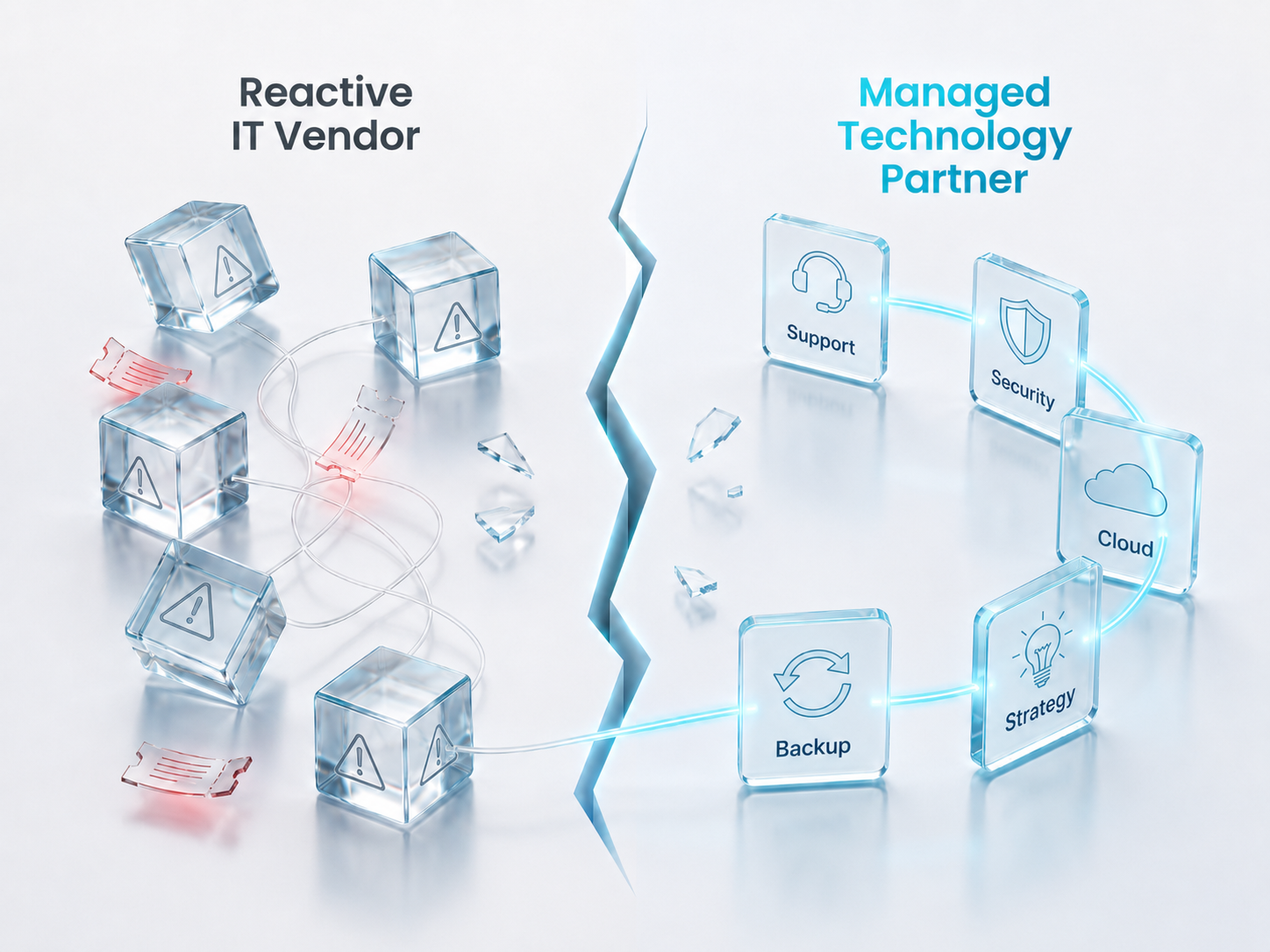
Reactive IT Vendor vs. Managed Technology Partner
The difference is not the number of services listed. It is whether they operate together.
Final Takeaway
When choosing a Managed IT Services provider, do not choose based only on price, ticket response, or a list of tools.
Choose a provider that can help your business answer the questions that matter most:
- Are our systems reliable?
- Are our users supported?
- Are our backups recoverable?
- Are our Microsoft 365 settings secure?
- Are our vendors accountable?
- Are our cybersecurity controls mature enough?
- Are we prepared for an incident?
- Does leadership understand IT risk and cost?
- Can our technology support growth?
- Are we making decisions before problems become expensive?
For Dallas small businesses, the right Managed IT provider should reduce risk, improve visibility, strengthen cybersecurity, support employees, stabilize operations, and help leadership make better long-term technology decisions.
That is the difference between buying IT support and building a managed technology foundation.
Ready to see what your current IT environment may be missing?
Get a clearer view of your support gaps, cybersecurity exposure, backup readiness, Microsoft 365 risks, vendor complexity, and next priorities.
Use the existing website form to request a Managed IT consultation or complimentary assessment.
Recommended Next Reads and Resources
To keep evaluating your IT environment, explore these related Infonaligy pages and resources:
Key Service Pages
Managed IT Services
Comprehensive IT management for small and mid-sized businesses.
ServicesIT Help Desk Services
Fast, structured support for your team.
ServicesManaged Security Services
Security operations integrated into daily IT management.
ServicesSOC Services
Security operations center monitoring and incident response.
ServicesMicrosoft 365 Consulting
Licensing, security, and governance for Microsoft 365.
ServicesBackup and Disaster Recovery
Tested backup and recovery with defined RTO/RPO.
ServicesVirtual CIO Services
Strategic technology planning and executive advisory.
ServicesAI Consulting and Intelligent Automation
AI consulting and intelligent automation for business operations.
Helpful Resource Topics
Managed IT Transition Roadmap
A structured plan for transitioning to a managed IT model.
ResourceCurrent-State IT Risk Scorecard
Assess your current IT risk posture across key areas.
ResourceIT Budget Planning Worksheet
Plan and forecast IT spending with a structured framework.
ResourceBusiness Continuity Plan Template
Build a business continuity plan for your organization.
ResourceIT Risk Quantification Model
Quantify IT risk in financial terms for leadership.
ResourceCybersecurity Readiness Assessment
Evaluate cybersecurity readiness across your environment.
ResourceIncident Response Plan Template
A tested incident response plan for your organization.
Related Blog Topics to Recommend
How a Dallas Construction Firm Recovered From Ransomware and Built IT That Scales
A case study in IT recovery and managed services transition.
BlogHow We Saved a Distribution Company From a Ransomware Disaster
Rapid incident response and recovery for a distribution company.
BlogCustom Applications for Business Process and Project Management
How custom applications support operational efficiency.
BlogHow Infonaligy Rebuilt Topgolf's Technology in Dallas
A large-scale technology transformation project.
BlogCybersecurity Readiness for Small Businesses
Essential cybersecurity practices for SMBs.
BlogMicrosoft 365 Security Risks for Growing Companies
Common M365 misconfigurations that create risk.
Why Dallas Businesses Choose Infonaligy
We built our Managed IT model around a simple principle: support and security should connect to long-term strategy, not live as separate line items.
Our team connects help desk support, proactive monitoring, Microsoft 365 and cloud governance, backup planning, infrastructure management, vendor coordination, cybersecurity alignment, and Virtual CIO guidance into one operating model.
That model is organized around three connected pillars:
Managed IT Services
Reliable support, productivity, infrastructure, cloud, vendor management, and strategic IT planning.
Managed Security Services
Risk assessment, monitoring, endpoint, email, cloud, identity, compliance, and incident readiness.
AI Consulting and Intelligent Automation
Reducing manual work, improving accuracy, and helping businesses adopt automation safely.
We bring more than 20 years of experience, a Dallas–Fort Worth presence, and Fortune 50 infrastructure backgrounds. Our team model includes Tier 2 escalation support, so growing businesses get access to deeper technical judgment without building an enterprise IT department internally.
Most businesses do not need "just IT support." They need a partner that can connect uptime, cybersecurity, cloud governance, vendor accountability, compliance readiness, and business growth into one managed operating model. That is how we work.
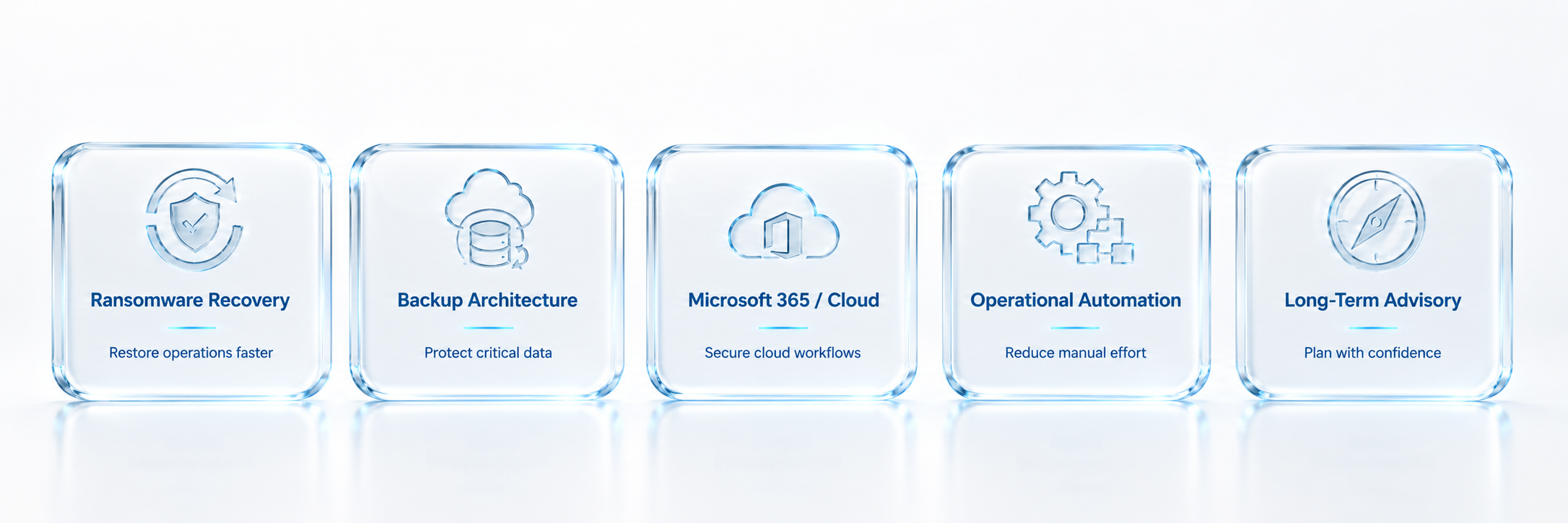
What strong Managed IT looks like in practice.
→
FAQs: Choosing a Managed IT Services Provider
A Managed IT Services provider is an outsourced technology partner that helps manage, monitor, support, secure, and improve a company's IT environment. This can include help desk support, network monitoring, Microsoft 365 administration, cybersecurity, backups, vendor coordination, documentation, and strategic IT guidance.
Look for responsive support, proactive monitoring, cybersecurity controls, backup and disaster recovery planning, Microsoft 365 governance, clear documentation, vendor accountability, compliance awareness, executive reporting, and a practical roadmap for improvement.
You may need Managed IT services if employees frequently lose time to technology issues, leadership lacks visibility into IT risk, Microsoft 365 is unmanaged, cybersecurity feels incomplete, vendors are hard to coordinate, backups have not been tested, or the business is growing faster than internal IT can support.
No. 24/7 support is valuable, but it is not enough by itself. A provider should also prove security maturity, monitoring, backup recoverability, cloud governance, documentation, compliance readiness, and executive-level planning.
Cybersecurity is important because every user, device, account, application, and vendor connection can affect business risk. A strong Managed IT provider should build security into daily operations through MFA, endpoint protection, email security, patching, access control, monitoring, backups, and incident response planning.
Ask what is included, what costs extra, how support is prioritized, what is monitored, how backups are tested, how Microsoft 365 is secured, how vendors are coordinated, what documentation is created, what happens during onboarding, and how leadership receives IT roadmap guidance.
A break-fix provider usually responds after something fails. A Managed Services Provider, or MSP, should provide ongoing monitoring, maintenance, support, security alignment, documentation, vendor coordination, and improvement planning to reduce preventable problems over time.
Managed IT services can reduce business risk by improving uptime, strengthening cybersecurity, validating backups, documenting systems, managing access, coordinating vendors, supporting compliance, and helping leadership make better technology investment decisions.
Dallas small businesses often rely on technology for revenue, operations, client service, compliance, remote work, and data security. A provider that looks complete on the surface may still leave gaps in backup recovery, Microsoft 365 governance, cybersecurity, documentation, local escalation, or executive visibility.
Infonaligy combines security-first Managed IT, fast-response support, proactive monitoring, Microsoft 365 and cloud support, backup planning, SOC capability, executive-level guidance, AI-assisted service delivery, and industry-specific experience for businesses that need technology to support growth, uptime, and risk reduction.
Serving Businesses Across Texas & Oklahoma